
CHAPTER 5 · Phased Array Ultrasonics Level 2
Reading PAUT Displays
In this chapter · 15 sections
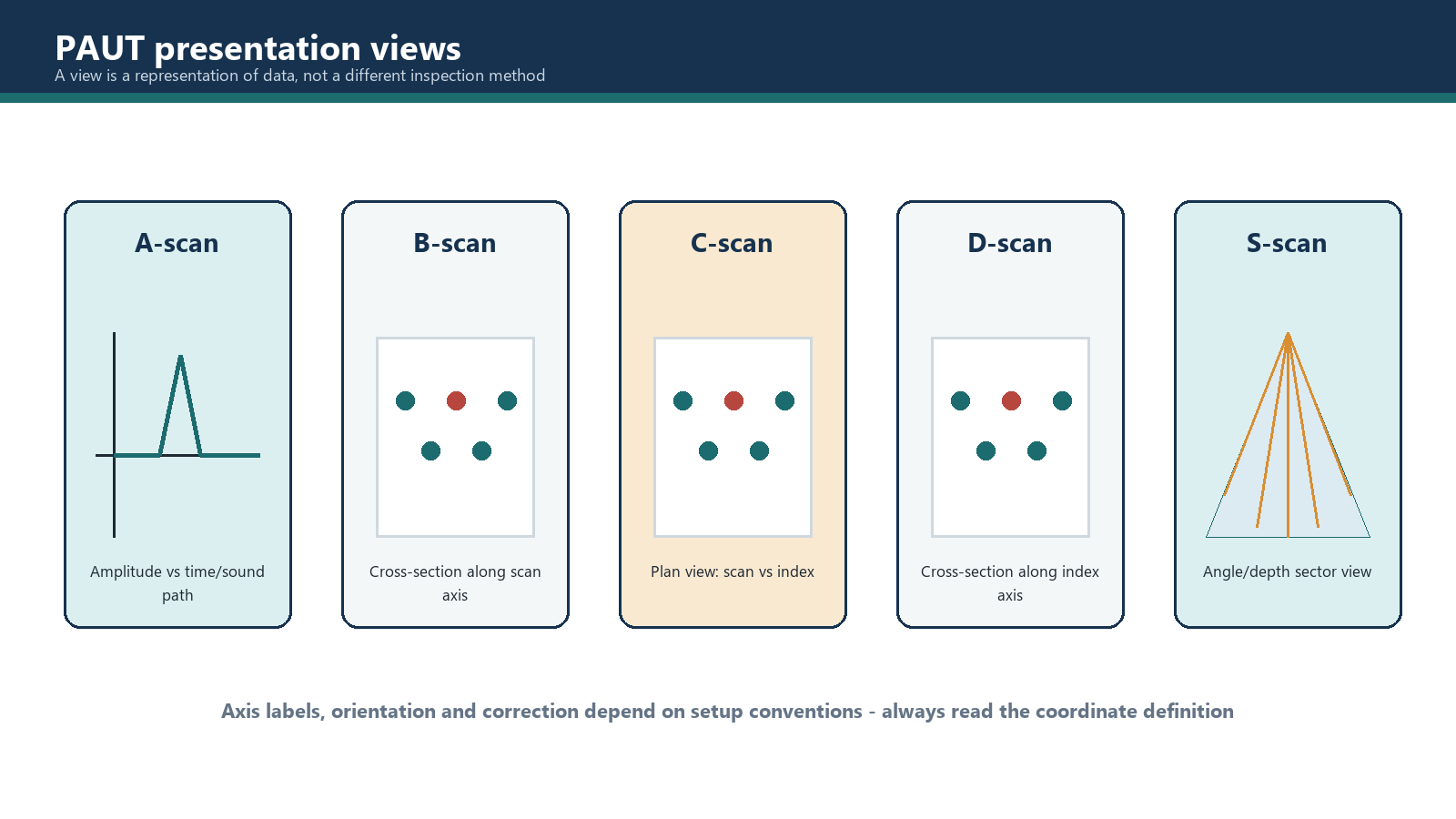
PAUT data do not become meaningful merely because they are colourful. A display is a selected way of arranging measured information. Each presentation answers a different question, and every interpretation must begin by identifying what its axes and colour scale actually represent.
Learning outcomes
After completing this chapter, the learner should be able to:
- distinguish a data presentation from a scanning pattern, acquisition mode or focal-law sequence;
- identify the usual axes and encoded quantity in A-, B-, C-, D- and S-scan presentations;
- explain the difference between corrected and uncorrected spatial data;
- choose complementary views for weld, component and corrosion applications;
- use gates, cursors and linked indications without confusing display aids with recorded evidence;
- recognise when a view cannot support a claimed location or dimension;
- check the setup information needed before relying on geometric correction; and
- describe an indication using neutral, traceable language.
Key terms
A-scan: A trace in which signal response is plotted against acoustic time or a derived distance.
B-scan: A sectional presentation, commonly showing scan position against depth or sound path.
C-scan: A plan-style presentation. In corrected encoded data it commonly uses scan and index position as its two spatial axes.
D-scan: An end or transverse sectional presentation, commonly showing index position against depth.
S-scan: A sectorial presentation assembled from focal laws covering a range of beam angles or directions.
Geometric correction: Conversion of time, beam and probe information into component-referenced coordinates using the applicable setup and geometry.
Uncorrected presentation: A view that retains a law, angle, aperture or raw beam coordinate rather than mapping every data point into its component position.
Encoded position: Position obtained from a calibrated movement device or other recorded position source.
Colour palette: The mapping between a measured or derived value and displayed colour.
Linked cursor: A cursor whose selected data point is identified in more than one view.
5.1 Begin with the question, not the view name
The letters A, B, C, D and S describe presentation conventions. They do not, by themselves, state how the probe moved, whether data were encoded, how focal laws were fired or whether the view is geometrically corrected. A raster scan can generate several views. A linear scan can also be shown in more than one presentation. Likewise, an S-scan describes a sectorial display, not the mechanical path followed by the probe.
Before interpreting a screen, answer four questions:
- What does each axis represent?
- What quantity controls the trace height or colour?
- Has position been encoded, inferred or omitted?
- Has geometric correction been applied, and with which setup values?
Labels supplied by the instrument or data file take priority over habit. Vendors may reverse axes, select different origins or use the same familiar name for a slightly different implementation. The interpreter should therefore read the units and legend rather than recognising the shape and guessing.
5.2 A-scan: inspect the underlying response
An A-scan plots signal response vertically against acoustic time horizontally, although an instrument may instead label the horizontal scale as sound path or a calculated depth. The current focal law, beam and reference convention determine what that distance means.
The A-scan is the primary view for examining waveform shape, arrival time, amplitude, gate crossings, saturation and nearby responses. It is especially useful when a coloured image suggests an indication but the interpreter needs to see whether the underlying response is coherent. It also exposes details that can disappear when many samples are compressed into a small number of display pixels.
An A-scan alone normally provides no scan-axis length. Unless it is linked to encoded position and other views, it represents one acquisition condition at one position. A peak at a particular sound path is not automatically a depth measurement; the conversion depends on the beam path and correction model.
5.3 B-scan: follow a section along the scan direction
A B-scan commonly places scan position on one axis and depth or sound path on the other. Signal amplitude is then represented by colour or brightness. It creates a side-sectional view along the direction of travel and can show how an indication develops, persists and terminates as the probe moves.
For encoded weld scanning, a B-scan can help estimate indication length along the scan axis and compare responses at different depths. For thickness or corrosion work, it may reveal a changing back-wall profile along a line. Its usefulness depends on the second axis: a sound-path B-scan is not identical to a depth-corrected B-scan. The axis label must be included whenever a measurement is reported.
5.4 C-scan: a plan view only when the coordinates support it
In a corrected, encoded raster data set, a C-scan commonly places scan position on one axis and index position on the other. Colour may show amplitude, time of flight, calculated thickness or another selected quantity. This makes the presentation useful for mapping the plan extent of corrosion, laminations or other features across an area.
The name C-scan does not guarantee a true component plan view. In some uncorrected PAUT implementations, one axis may be scan position while the other represents focal law, angle, aperture number or another beam coordinate. Such a display can be valuable for recognising law-to-law behaviour, but the second axis is not automatically a physical index position. Measuring a plan width from it would therefore be unjustified.
Worked example: what does the coloured patch measure?
An encoded raster data set displays scan position from 0 to 300 mm horizontally and index position from 0 to 80 mm vertically. Colour represents calculated remaining thickness. A low-thickness region extends from scan positions 118 to 146 mm and index positions 31 to 43 mm.
From this presentation, the displayed plan extents are:
- scan direction: 146 - 118 = 28 mm;
- index direction: 43 - 31 = 12 mm.
Those values describe the extent selected by the stated colour or evaluation boundary. They do not establish defect through-wall height. A depth or thickness view and the applicable evaluation method are still required.
5.5 D-scan: inspect the transverse section
A D-scan commonly shows index position against depth, giving an end or transverse section through an encoded area. It complements the along-scan section provided by a B-scan. In area mapping, the paired sectional views let the interpreter examine a feature from two perpendicular directions.
The D-scan is meaningful only when the index coordinate exists and its relationship to the component is known. A single-line manual scan without recorded index position cannot suddenly acquire a reliable transverse dimension because the software offers a D-scan button.
5.6 S-scan: compare response across a sector
An S-scan assembles responses from focal laws covering a range of angles or directions. In a simple uncorrected form, one dimension may represent angle or law while another represents sound path. In a geometrically corrected sectorial view, the data may be mapped to projected horizontal distance and depth, producing a wedge-shaped component view.
S-scans are widely used in weld examination because they show how reflectors respond to neighbouring beams and where the mapped responses lie relative to the weld profile. They are also useful for confirming coverage and identifying responses that follow a surface or geometry. They do not eliminate the need to inspect individual A-scans or alternative views.
An apparent change in response across the sector can result from beam orientation, focal characteristics, coupling, geometry or reflector directivity. It should not be described as a change in defect size without supporting evidence.
5.7 Typical axis and encoding guide
| Presentation | Common axes or trace basis | Common amplitude/value representation | Principal use |
|---|---|---|---|
| A-scan | acoustic time, sound path or derived distance | trace height | waveform, timing and amplitude review |
| B-scan | scan position versus depth or sound path | colour or brightness | along-scan section |
| corrected C-scan | scan position versus index position | amplitude, time, thickness or another value as colour | plan mapping |
| uncorrected C-type view | scan position versus law, angle or aperture coordinate | commonly amplitude as colour | response pattern by beam coordinate |
| D-scan | index position versus depth | colour or brightness | transverse section |
| S-scan | angle/law and sound path, or corrected horizontal position and depth | commonly amplitude as colour | sector coverage and weld-oriented interpretation |
This table is a reading guide, not a substitute for the instrument legend. Axis order may be reversed, and a manufacturer may apply a different presentation label.
5.8 Corrected and uncorrected data
Geometric correction uses information such as wedge geometry, exit point, wedge delay, probe position, sound velocity, refracted angle, component geometry and reference origin. It transforms an acquired time-and-beam coordinate into a component-referenced position.
Correction is only as reliable as its inputs. A plausible-looking image can still be misplaced if the wrong wedge, velocity, angle, offset or component geometry was entered. The correction also does not compensate for poor coupling, inadequate coverage, excessive saturation or an unsuitable focal-law design.
Uncorrected data are not inherently inferior. They can preserve a direct relationship to law number, sound path or recorded time and may help diagnose a response. The critical requirement is to avoid claiming a physical location or dimension that the displayed coordinates do not support.
Worked example: a location check
A sectorial view places a response at 22 mm depth after geometric correction. Review of the setup finds that the stored wedge delay belongs to a different wedge. The displayed 22 mm position must be treated as unverified. The correct action is to repair or recreate the setup as permitted, confirm calibration and reprocess or reacquire the data according to the controlling procedure. The attractive geometry on the screen is not independent proof; pixels are famously obedient to bad inputs.
5.9 Combined views and linked evidence
Combined layouts are most effective when each panel contributes different evidence. A practical weld layout may link an S-scan to the current A-scan and an encoded B- or C-type view. Selecting an indication in the encoded view should identify the corresponding probe position, focal law and A-scan. A corrosion layout may pair a thickness C-scan with B- and D-scans through the selected location.
Linked cursors reduce navigation error, but the interpreter should confirm that the views refer to the same group, data point, gate and correction state. Two neighbouring panels may look coordinated while displaying different groups or quantities.
Overloading the screen with every available panel can hide the evidence. Use enough views to test the interpretation, then preserve the view settings needed to reproduce the result.
5.10 Selecting a view for the task
| Interpretation question | Useful starting view | Supporting check |
|---|---|---|
| Is the response a coherent ultrasonic signal? | A-scan | neighbouring positions and laws |
| How does it extend along the scan direction? | B-scan or encoded C-scan | A-scan at each boundary |
| Where is an area of reduced thickness? | corrected thickness C-scan | B- and D-scans through the area |
| How does a weld response behave across angles? | S-scan | individual A-scans and encoded view |
| What is the transverse section of an area feature? | D-scan | C-scan cursor position |
| Is a plan measurement valid? | corrected encoded C-scan | axis units, encoder calibration and correction setup |
View selection should follow the inspection objective and procedure. No single presentation establishes every characteristic of an indication.
5.11 Gates, palettes and cursors
A gate defines a time or distance region used for detection, measurement or recording. Moving it may change which response supplies the displayed amplitude, time or thickness value. The operator should confirm the gate basis before comparing two images.
Colour is a coding system, not a material property. A palette change can make the same stored values look more or less dramatic. Record the represented quantity, range, threshold and palette when these affect interpretation. Do not infer severity solely from red, because software designers enjoy alarming colours almost as much as inspectors enjoy arguing about them.
Cursors provide readings at selected coordinates. They improve repeatability when their reference, units and correction state are known. Cursor precision on the screen does not prove measurement accuracy beyond the calibration, scan increment, sampling and beam characteristics of the data.
Common traps
- Treating an S-scan as the name of a probe movement.
- Calling every coloured top-looking image a corrected C-scan.
- Measuring a physical index width when the axis actually shows focal-law number.
- Reading sound path as depth without confirming the conversion.
- Assuming geometric correction can fix incorrect setup data.
- Using colour alone to judge indication severity.
- Reporting cursor digits beyond the capability of the acquisition and calibration.
- Reviewing a combined layout without checking that all panels use the same group and data point.
- Estimating through-wall height from plan extent.
- Ignoring the A-scan when a compressed image looks convincing.
Chapter summary
- A presentation is a way of arranging data; it is not an acquisition mode or mechanical scanning pattern.
- The A-scan shows the underlying response against time or a derived acoustic distance.
- B- and D-scans provide sectional views along different encoded directions.
- A corrected encoded C-scan can map plan position, while an uncorrected C-type view may retain law or beam coordinates.
- An S-scan compares data across a sector and may be displayed in raw beam coordinates or corrected component coordinates.
- Geometric correction depends on valid wedge, delay, velocity, angle, position and geometry information.
- Combined views are strongest when linked panels provide complementary evidence.
- Axes, units, colour quantity, gate basis and correction state must be checked before measurement.
Study and revision only. This is not an approved inspection procedure, acceptance criterion or qualification.