
CHAPTER 28 · Phased Array Ultrasonics Level 2
One Reflector, Several PAUT Views
In this chapter · 21 sections
Why this matters
PAUT instruments can show an A-scan, a sector image, a side view, a plan view and several corrected displays at once. The names are easy to memorise but easy to misunderstand because every view arranges acquired ultrasonic values. Each answers a particular spatial question and hides other information. This chapter follows one reflector through the common displays before discussing sampling, bit depth or file size. The goal is to make every coloured patch traceable to a waveform, a focal law and a probe position.
What you already need
- One focal law produces one transmit-receive beam condition.
- Each law produces an underlying A-scan.
- A law group contains several related laws.
- Echo time and echo amplitude answer different questions.
- Displayed location depends on the setup's geometric model.
What you will learn
- Read the basic axes of A-, S-, B-, C- and D-type views.
- Follow one reflector from a waveform into linked spatial presentations.
- Distinguish electronic law order from mechanical probe position.
- Explain corrected and uncorrected displays without treating either as a photograph.
- Use gates, cursors and palettes while keeping the underlying evidence visible.
- Describe, at a practical level, how analogue voltage becomes stored data.
Words you will meet
- Presentation: the arrangement used to display acquired data.
- Encoded position: a probe or scanner position stored with ultrasonic data.
- Gate: a selected time or distance region used for measurement or recording.
- Corrected view: a display that uses geometry to place a response in component coordinates.
- Sample: one numerical value representing the signal at one instant.
- Bit depth: the number of binary digits available for one stored value.
- Aliasing: a false representation caused when a changing signal is sampled too slowly.
28.1 Begin with the underlying A-scan
Use a simple example. An array and wedge sit beside a weld. One focal law sends a shear wave toward a small reference reflector. The returning echo appears as a peak on the law's A-scan. Horizontally, the trace represents time, sound path or another selected distance scale. Vertically, it represents received response after the enabled gain and processing.
This waveform is the evidence underneath the other PAUT views; sector, side and plan presentations do not create a new echo. They select or calculate values from many A-scans and place those values according to law and position. When a coloured feature is important, return to the contributing trace and check signal shape, timing, saturation, noise and gate placement.
The same warning from conventional UT applies. A tall peak is not a measured flaw height. Its size depends on reflector orientation, beam field, coupling, attenuation, aperture, gain and processing. A peak's horizontal position can support location only when the correct velocity, delay, wedge and law model are in use.
Linked instruments often move the A-scan cursor when a point is selected in another view. That link is valuable because it connects a display pixel to a law and time sample. A screenshot without that context may look persuasive while hiding which waveform produced it.
28.2 S-scan: compare laws in an angular group
Suppose a group contains focal laws from lower to higher refracted angles. The instrument can place the A-scans beside one another in law order and map their time axes along nominal beam paths. The result is commonly called an S-scan or sectorial presentation.
One direction across the display represents law or angle. The other represents time, sound path or a corrected spatial coordinate. Colour or brightness represents a selected signal quantity. A small reflector may appear as a coloured response extending across several neighbouring laws because the beam has width and the target responds over an angular range.
The sector edges are programmed limits, not proof that the extreme beams are useful. Equal spacing of drawn rays does not mean equal acoustic sensitivity. A calibration can equalise a chosen reference response, but it cannot remove poor transmission, directivity limits, lobes or missing coverage. Inspect the underlying A-scans near the edges instead of trusting the shape of the fan.
An S-scan also does not state how the probe moved. It can be produced while the probe is stationary. The word scan is therefore overloaded. Here it names a presentation or electronic angle sequence, not necessarily mechanical movement over the component.
28.3 B-scan: follow the reflector along the scan direction
Now move the probe along a declared scan axis and store data at known positions. A B-scan usually places scan position on one axis and time, sound path or corrected depth on the other. It shows how a selected response changes along the direction of travel.
For a point-like reflector, the displayed feature may spread along the scan direction because the acoustic beam has a finite footprint and because acquisitions are taken at discrete positions. A long indication can also produce a long response. The screen length alone cannot separate those causes. A stated endpoint or sizing method is needed.
A B-scan is useful for seeing response entry and exit, weld continuity, back-wall position and possible encoder problems. Repeated columns, stretched geometry or a sudden position jump may come from wheel slip, reversed direction or missed counts rather than the component.
The vertical axis must be read carefully. A display labelled “depth” may already include geometric correction. Another may show uncorrected sound path. Comparing either with a drawing without checking the axis can move a response to the wrong place.
28.4 C-scan: a plan view only when two coordinates exist
A C-scan presents response over two surface-related coordinates, commonly scan and index, and is often described as a plan view. That description is valid only when both axes have a controlled relationship to the component.
In a two-axis raster, the scanner acquires one line, moves by a known index amount and acquires the next. The C-scan can then show a gated response value at each surface position. Depending on the setup, that value might be peak amplitude, time of flight, thickness or another measurement, and only the data definition identifies what the palette represents.
Consider a coloured patch in the C-scan. It does not automatically show the physical outline of a discontinuity. The patch can be widened by beam footprint, gate selection, line spacing, scan increment, interpolation and threshold. It can also be caused by coupling loss if the selected value falls when the back-wall signal disappears.
A one-line encoded scan supplies only one mechanical coordinate. Software may still create a strip or projected view, but it has not measured an independent index position. A genuine two-dimensional map needs a second controlled coordinate or an explicitly declared construction.
28.5 D-scan: look across the index direction
A D-scan commonly shows index position against depth or sound path as a transverse section through data acquired over more than one index position. This view helps the reviewer examine how a response extends across the width of the inspection area.
The D-scan is especially useful when a raster or multi-line scan crosses a weld. It can show the relationship among the weld centreline, probe offset and a response at several index positions. As with the B-scan, displayed width combines target behaviour, beam footprint and acquisition spacing.
Some instruments use view names differently. The reliable habit is to read the axes and data definition rather than relying on the letter alone. A controlled report should state which coordinate is on each axis, which value supplies colour and whether geometry correction is active.
28.6 Trace one reflector through linked views
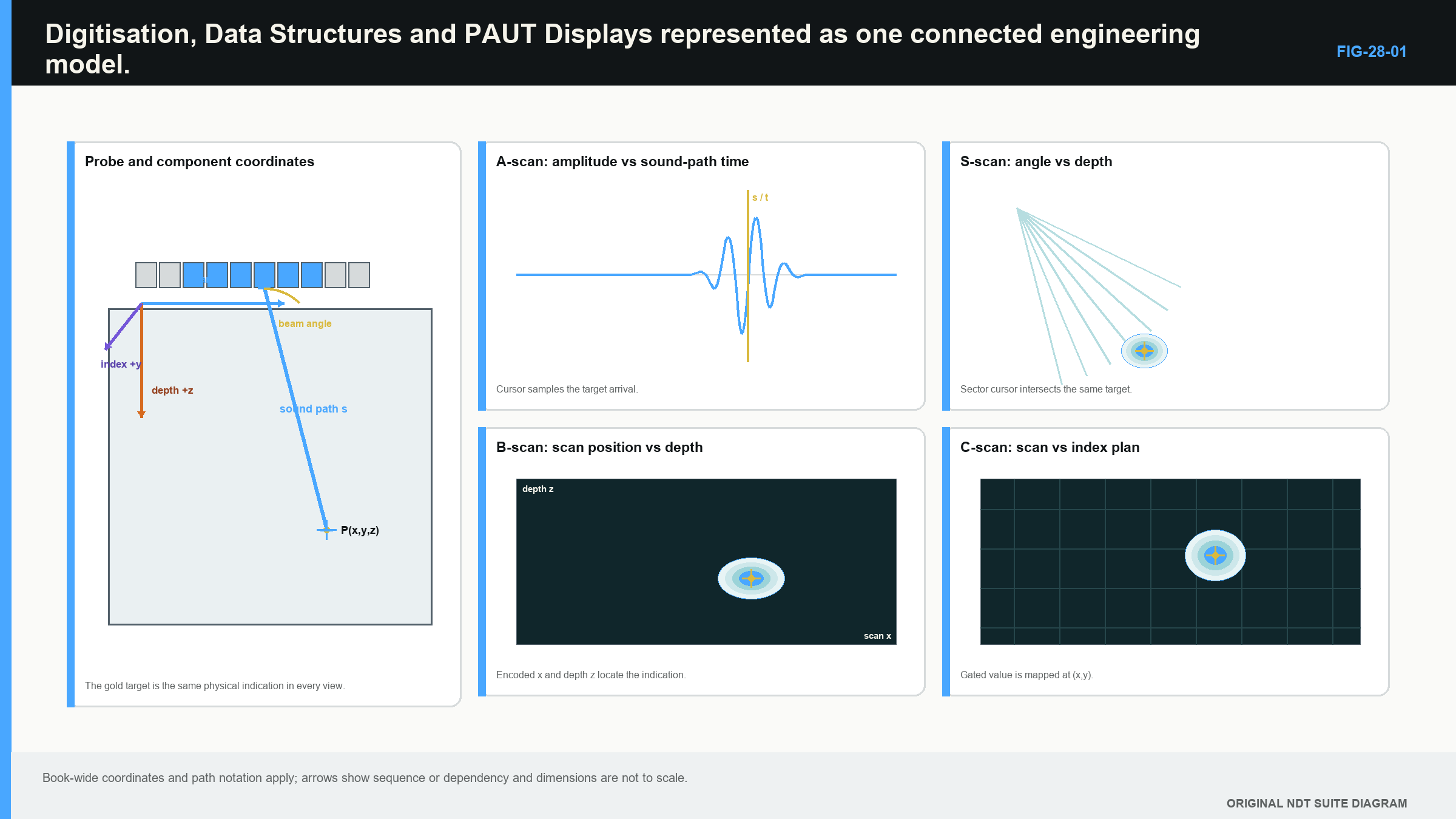
Return to the same small reflector. One law produces a clear A-scan peak. Neighbouring angular laws also receive weaker peaks. If the probe moves past the reflector, the response rises, peaks and falls over several encoded positions. If several index lines cross it, the response also appears over a limited transverse range.
The linked displays now tell related parts of the story:
- The A-scan shows the actual response against time or distance for one selected law and position.
- The S-scan shows how response changes across the law or angular group at one selected mechanical position.
- The B-scan shows how response changes along the scan direction for a selected law, gate or processing rule.
- The C-scan shows a selected response quantity over scan and index coordinates when both are available.
- The D-scan shows the response across the index direction against depth or path.
No single view is automatically the truth view. The A-scan preserves waveform detail but gives little spatial overview. The sector view helps compare angles but can hide the firing sequence. The C-scan shows plan distribution but can collapse depth information into one value. Linked review is strongest when the same cursor position can be followed back through law, time and encoded location. [R014] [R046]
A linked-cursor walk-through
Select the brightest part of the reflector in the S-scan. Note the law or angle, the measured time and the response value. Open the linked A-scan and confirm that a real echo peak lies under the cursor rather than a gate edge or clipped plateau.
Next, hold the law and move along the B-scan. The response should rise, reach a maximum and fall as the encoded probe passes the reflector. Check the stored positions around both ends. If the feature begins or ends exactly at a file boundary, the apparent length may be limited by acquisition rather than the reflector.
Move to the C-scan and identify which gated value produced its colour. Compare the patch with the scan and index coordinates. A low patch accompanied by back-wall loss suggests a different explanation from a high isolated peak with stable coupling.
Finally, return to the corrected cross-section and compare the cursor with a known component feature. This short loop ties colour to waveform, law, position and model. It also exposes cases where several views merely repeat the same mistaken assumption.
The following figure places these axes around one common dataset. Notice that the reflector does not change when the view changes. Only the selection and arrangement of its recorded evidence change.
28.7 Corrected and uncorrected displays
An uncorrected presentation places responses using measured time, sound path and law order with limited transformation; a corrected presentation uses entered geometry to calculate component position. Both can be useful.
Correction can make a weld response easier to compare with a cross-section. It can also make a wrong model look convincing. If wedge height, exit position, velocity, surface profile or component thickness is wrong, the corrected feature can be shifted or distorted. Smooth graphics do not indicate model accuracy.
A practical location check begins at the A-scan. Confirm the echo identity and measured time. Confirm which law and aperture produced it. Then follow the path through wedge and component using the declared mode and geometry. Compare the corrected cursor with a known feature where possible. This chain reveals whether a surprising position comes from the physical response or the display model.
Do not compare an uncorrected sound-path cursor directly with a true-depth drawing. Do not compare a corrected depth with a raw time calculation without including wedge and system delays. State the representation used whenever a measurement is recorded.
28.8 Gates, palettes and cursors
A gate selects a region of the waveform for detection, measurement or recording. It may report peak amplitude, time at a threshold crossing, peak time or another instrument-defined value. The algorithm matters because a gate starting after the first relevant response can hide it. A gate containing two echoes can jump between them as their relative heights change.
Set the display so the gate boundaries are visible during review. Check the underlying A-scans at the beginning, middle and end of a feature. A gated map should never be treated as proof that no response exists outside the gate.
A colour palette maps numerical values to colours. Changing the palette can make a feature appear sharper, larger or more dramatic without changing the stored data. Saturated colours can also hide the difference between high responses. Record the displayed scale and avoid descriptions based only on colour names.
Cursors should carry their coordinate meaning. A useful cursor readout identifies scan position, index position, law or angle, time or path, corrected depth and response value as applicable. “The indication is at 35” is not a measurement until the number has units and a coordinate definition.
28.9 Behind the display: from voltage to samples
The returning probe signal is initially an analogue voltage that changes continuously with time. The instrument measures that voltage at closely spaced instants. Each measurement is a sample. A sequence of samples represents the waveform numerically so it can be processed, displayed and stored.
Sampling frequency states how many samples are taken each second. Faster sampling provides closer time spacing. It does not improve the physical pulse or acoustic beam, but it can represent their time variation more faithfully. Sampling too slowly can create aliasing, in which high-frequency content appears as a false lower-frequency pattern. The formal sampling proof belongs in the engineering part; the Level 2 rule is to use validated acquisition settings and recognise that a smooth displayed line may be interpolated between relatively sparse samples. [R005]
Bit depth states how many binary digits are available for one numerical value. More bits provide more possible codes over the selected input range. This can reduce coarse quantisation steps, but it does not create signal-to-noise ratio that the analogue chain never had. A clipped input remains clipped even if stored with many bits.
Filtering can occur before or after digitisation. An analogue anti-alias filter limits frequency content before sampling. Digital high-pass, low-pass or band-pass filters change which parts of the stored spectrum contribute to the displayed waveform. The signed, unrectified electrical waveform is commonly called the radio-frequency (RF) waveform. Rectification can show absolute or positive-going response rather than its signed oscillation. Smoothing and envelope processing can improve readability while reducing detail. The record should distinguish raw acquired RF data from processed and displayed values.
28.10 Acquired, stored, processed and displayed are not synonyms
An instrument may acquire more information than it stores. It may store A-scans only inside a gate, store peak values instead of full waveforms, compress amplitudes or omit laws not selected for recording. Review software may then apply correction, interpolation, smoothing or palette mapping. Finally, the screen turns those values into pixels.
These stages should be kept separate:
- Acquired data are the numerical samples produced by the measurement electronics.
- Stored data are the part preserved in the file, together with available position and setup information.
- Processed data are values produced by filtering, rectification, correction, interpolation or measurement rules.
- Displayed data are the colours, traces and labels drawn for the user.
A reportable response should be traceable through those stages. If only a screenshot remains, the reviewer may be unable to change a gate, inspect the RF waveform or confirm the law and position. If full A-scans are retained, later review is more flexible but file size and acquisition demand increase.
Data volume grows with the number of stored positions, focal laws, samples per waveform and bytes per sample. The detailed file-size equation is moved to the later acquisition-engineering chapter because it is a planning tool rather than a prerequisite for reading the display. At Level 2, understand the trade-off: more laws, longer ranges, finer encoded spacing and fuller waveform storage usually require more time and space.
28.11 Use the view that answers the present question
Choose the display from the information needed. Use an A-scan to inspect echo shape, timing, noise, saturation and gate behaviour. Use an S-scan to compare laws or angles at one probe position. Use a B-scan to follow a response along travel. Use a C-scan to inspect plan distribution when two surface coordinates exist. Use a D-scan to inspect the transverse section.
Then cross-check. A feature that looks long in a B-scan should be checked against beam footprint and scan increment. A dark C-scan patch should be checked for back-wall loss and coupling. A bright sector response at one extreme law should be checked against usable steering range and the raw A-scan. A corrected position should be checked against a known feature.
The view name does not establish acquisition quality. It also does not establish reflector character. Multiple views are valuable because each preserves and hides different relationships. Their agreement is evidence only when they are linked to the same valid data and their assumptions are understood.
In plain words
- Every PAUT presentation is built from acquired ultrasonic values.
- The A-scan is the underlying waveform for one law and position.
- The S-scan compares related laws, commonly across an angular sector.
- B-, C- and D-type views depend on declared mechanical coordinates.
- A corrected display uses a model and can be wrong when its inputs are wrong.
- Gates select data; palettes change appearance; neither creates new physical evidence.
- Sampling and bit depth affect numerical representation, not the acoustic event itself.
- Stored data may contain less information than the instrument originally acquired.
Key terms
A-scan; S-scan; B-scan; C-scan; D-scan; encoded position; gate; corrected view; sample; bit depth; aliasing.
Key relationships
- one selected law and position -> one underlying A-scan;
- related laws at one position -> sector-style comparison;
- repeated positions along travel -> B-scan relationship;
- controlled scan and index positions -> plan or transverse views;
- time samples + law identity + position + geometry model -> displayed pixel;
- more retained waveforms and finer spacing -> more data volume.
Common mix-ups
- A sector display is not the same thing as physical probe movement.
- A C-scan patch is not automatically a flaw outline.
- Sound path and true depth are not interchangeable axes.
- More display pixels do not mean finer acquired sampling.
- A changed palette can change appearance without changing stored evidence.
Bridge to Chapter 29
The displays now have a physical source: selected elements in an array and sound passing through a wedge. Chapter 29 opens the probe and wedge model, then separates the whole array, the selected aperture and the effective acoustic aperture used by a law.
Sources and further study
- [R005]
- [R014]
- [R046]
Study and revision only. This is not an approved inspection procedure, acceptance criterion or qualification.