
CHAPTER 29 · Phased Array Ultrasonics Level 2
The Array, the Selected Elements and the Wedge
In this chapter · 18 sections
Why this matters
PAUT setup screens contain many numbers about probes and wedges. A learner can enter them correctly and still have no clear picture of what they describe. This chapter builds that picture in layers. First comes the complete physical array. Next comes the smaller set of elements selected for one focal law. Then comes the acoustic aperture that the component effectively receives after steering, refraction and directivity take effect. The wedge is included throughout because it fixes the probe to the component, carries the pulse to the interface and supplies geometry used by the focal-law calculation.
What you already need
- An array contains individually addressable elements.
- Selected elements form an aperture for one focal law.
- Element delays can steer and focus the combined field.
- Every law still produces an A-scan.
- Corrected displays depend on probe, wedge and material inputs.
What you will learn
- Identify the main functional layers of an array probe.
- Separate the full physical array from the active and effective apertures.
- Use pitch, element width and kerf without confusing them.
- Explain element directivity as a usable angular range.
- Describe how wedge fit, condition and data affect the beam model.
- Select a plausible probe-and-wedge arrangement from component needs.
Words you will meet
- Pitch: centre-to-centre spacing between neighbouring elements.
- Element width: active element dimension in the array direction.
- Kerf: separation between adjacent active element regions.
- Physical aperture: the geometric span of the selected elements.
- Effective aperture: the portion and projection that contributes usefully in the stated direction.
- Directivity: the angular range over which an element contributes useful sound.
- Index point: a declared physical reference used to place the probe or wedge.
29.1 Start with the complete probe
A typical linear-array probe looks like one compact block from the outside. Inside, its active piezoelectric material is divided into a row of small elements. Conductors connect the elements to the cable and instrument. Backing material controls ringing and absorbs energy travelling away from the component. Matching and protective layers help transmit sound into the wedge or test surface while protecting the active material.
These layers have the same broad jobs found in conventional probes. The array adds repeated element geometry and many electrical connections. Nominal centre frequency, pulse length, sensitivity and bandwidth therefore depend on the complete probe and instrument chain, not only on the material printed in a catalogue. Similar nominal probes can respond differently, which is why reference comparison and system checks matter. [R010]
The element numbering direction is part of the probe definition. Element 1 may be at one end of the row, but the physical orientation must be verified for the mounted probe and wedge. Reversing the probe while keeping the software orientation unchanged can mirror aperture positions and corrected coordinates.
The full array length is not the beam width. It describes the available element region. A focal law normally selects only part of that region. The remaining elements may be used in later laws, reserved for another group or left inactive.
29.2 Build the geometry one term at a time
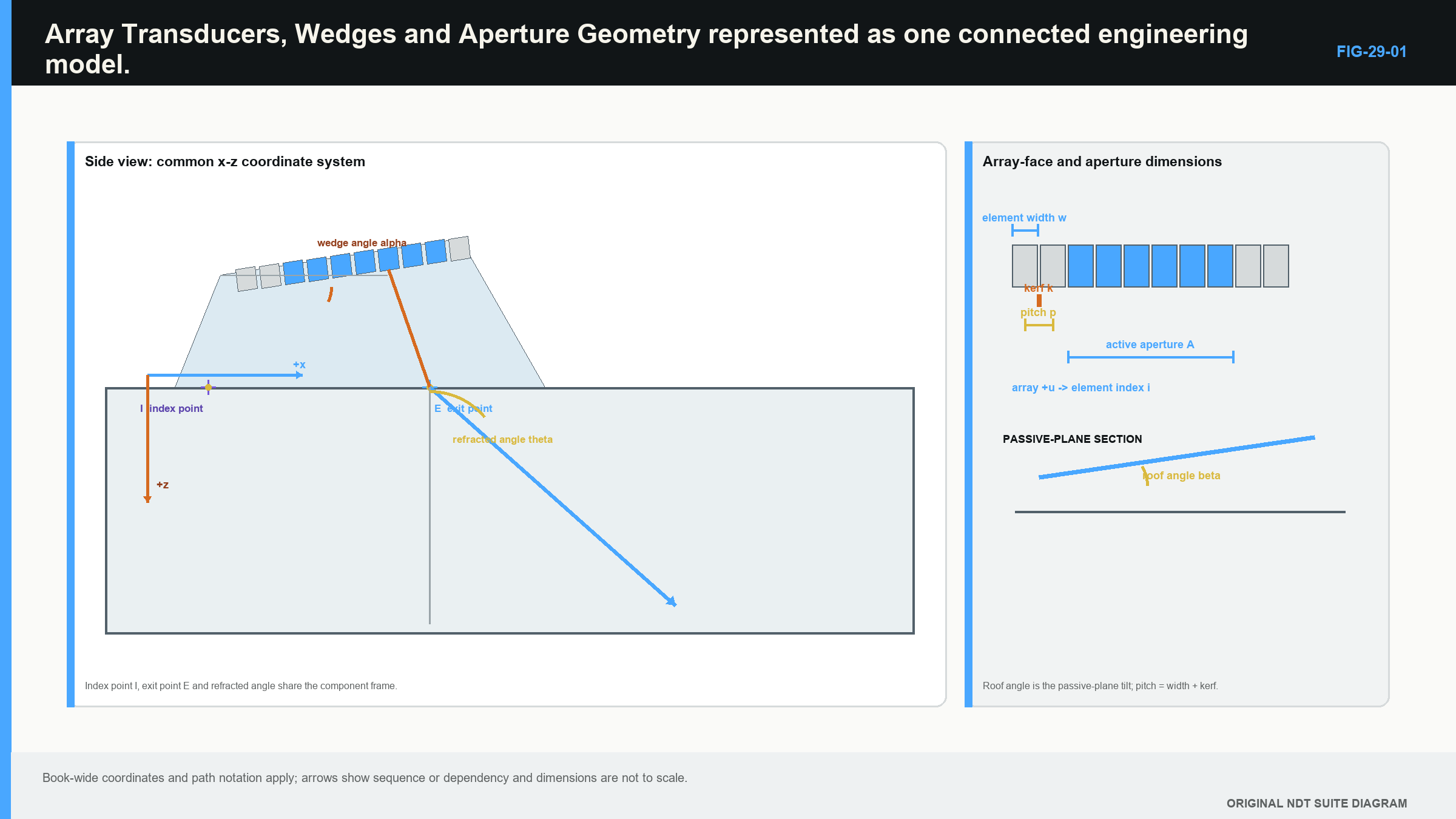
Look down on a straight row of equal elements. The active width of one element is e. A narrow inactive or separated region lies beside it. That separation is the kerf, written k. The distance from the centre of one element to the centre of the next is the pitch, written p.
For a simple uniform row:
pitch = element width + kerf
This relationship is geometric. It does not say how much of each element vibrates uniformly or how the field behaves in the component. It provides the positions from which the focal-law model starts.
The element dimension across the row controls behaviour in the active plane. The dimension perpendicular to the row is often called elevation and influences the passive-plane field. A one-dimensional linear array can steer and focus electronically mainly in its active plane. It cannot be assumed to have the same control in elevation.
Element count is also a geometric resource, not an aperture by itself. A 64-element array contains 64 addressable positions, but a law using 16 of them has a 16-element active aperture. Another law may use the next 16 or use a different count.
29.3 Calculate the selected physical aperture
The physical aperture is the span from the first edge of the first selected element to the far edge of the last selected element. For N adjacent elements on a uniform row, there are N - 1 centre-to-centre pitch intervals plus one element width.
In words:
selected aperture = pitch intervals between element centres + one element width
| (29.1) Physical aperture of adjacent array elements · EQ-29-01 Where: A = physical aperture in the array direction (mm); N = number of adjacent selected elements; p = centre-to-centre pitch (mm); e = active width of one element in the same direction (mm) Model limits: one uniform straight row; adjacent elements; equal pitch and width; aperture measured edge to edge |
|---|
The equation uses N - 1 pitches because pitch is measured between centres. Multiplying N by pitch would add a centre spacing beyond the last selected element. Multiplying N by element width would ignore every kerf.
| Worked example · Finding the physical width of a selected aperture WE-29-01 Given: A linear array has 0.60 mm pitch and 0.50 mm element width. One focal law selects 16 adjacent elements. Find: The physical aperture in the active plane. Method: There are 15 centre-to-centre intervals between 16 elements. Use A = (N - 1)p + e. A = (16 - 1)(0.60 mm) + 0.50 mm A = 9.50 mm Answer: The selected physical aperture is 9.50 mm wide. What it means in practice: The probe may contain 64 elements, but this law is using a 9.50 mm edge-to-edge aperture. A later law can move that aperture along the array without changing its width. Common mistake: Calling the aperture 9.60 mm by multiplying 16 by pitch adds spacing that does not exist beyond the last element centre. |
|---|
The physical aperture is an important setup value, but it is not automatically the useful acoustic aperture at every angle. Steering changes how the aperture projects toward the selected direction. Element directivity and interface transmission can reduce the contribution from some elements. That next layer is explained qualitatively here and developed mathematically in Part V.
29.4 Active aperture and effective acoustic aperture
The active aperture is the set of elements the law tells the instrument to use. The physical aperture is their geometric edge-to-edge span. The effective acoustic aperture is the part of that selection that contributes usefully to the transmitted and received field for the stated law and material path.
These three can differ. Suppose a law selects 24 elements. All 24 are active in the setup file, so the physical span can be calculated. At a moderate steering angle, most may contribute well. At an extreme angle, element directivity, wedge transmission and the projected geometry may reduce the outer contributions. The acoustic result can behave as though the useful aperture is smaller or unevenly loaded.
An effective aperture is therefore not obtained by counting coloured element boxes on the setup screen. It depends on direction, frequency, wedge path, element response and receive processing. Part V introduces projection and field models for that purpose. At Level 2, use the distinction to avoid claiming beam width or focus from physical count alone.
The receive aperture also matters. A reflector sends energy back toward the probe, and the selected receive elements do not all see it equally. The instrument applies receive delays and combines the channels. A transmit-only ray drawing cannot describe the full pulse-echo sensitivity.
29.5 Directivity as a usable angular window
One small element does not radiate equally in every direction. Its size relative to wavelength affects how rapidly its response falls away from its natural direction. This angular behaviour is element directivity.
For crossover learning, treat directivity as a usable window. The desired steered beam must lie inside a region where the participating elements can transmit and receive enough useful energy. A smaller element dimension relative to wavelength generally supports a broader angular contribution in that plane. A larger element can be more directional.
Directivity is not the same as total-aperture beam spread. Element directivity describes each small source. The full selected aperture combines many sources and forms a main lobe with its own width and side structure. Confusing the two leads to opposite conclusions: a broad single-element pattern can support steering, while a larger combined aperture can make the useful main beam narrower.
The usable steering range is also affected by wedge angle, refraction, mode conversion, pitch relative to wavelength, focus, aperture projection and target response. An instrument may allow a programmed angle that the probe-wedge-component combination cannot support well. The displayed angle is a request to the model, not proof of the field.
29.6 Common array arrangements
A linear array places elements in one row. It supports electronic control mainly along that row and is common for weld examination. A curved array follows a convex or concave surface or creates a shaped aperture. Its geometry must be represented correctly because the element positions are no longer on a straight line.
A dual-linear array separates transmit and receive rows. This can reduce some interface effects and support particular near-surface or coarse-material applications, but roof angle, transmit-receive geometry and channel mapping become important. A matrix array has elements in two directions and can support two-dimensional electronic control, although channel and law demands rise quickly.
Circular and annular arrangements use rings or curved element patterns for specialised focusing or component access. Their element count should not be compared directly with a linear-array count. What matters is the physical arrangement, selected aperture, control direction and demonstrated field.
Select the array arrangement from the component and target problem. A matrix probe is not automatically better because it has more elements. It may add weight, data, setup complexity and passive connections without improving the required decision.
29.7 The wedge is part of the beam-forming system
The wedge provides a controlled path between array and component. It positions the probe, establishes an incident geometry, supports refraction and often gives a stable contact face for scanning. Its material velocity, angle, height and probe mounting position are used when focal laws are calculated.
Important wedge information includes:
- the wedge identity and intended probe pairing;
- element orientation and first-element reference;
- nominal angle, roof angle and relevant dimensions;
- wedge velocity for the represented condition;
- probe-to-wedge and wedge-to-component offsets;
- contact-face shape and wear condition;
- exit or index reference used by the scan plan;
- temperature, coupling and mounting limits relevant to the technique.
A catalogue model is a starting point. A custom, contoured or worn wedge may differ from the database geometry. A wrong height or element position changes predicted entry points. A wrong wedge velocity changes delay and refraction calculations. Wedge-delay calibration can align a timing offset after the geometry is correct; it cannot turn an incorrect wedge model into the right one.
Physical fit comes before screen correction. A flat wedge rocking on a small pipe can change contact, entry conditions and amplitude as it moves. The software may still draw a stable sector because it assumes the wedge remained seated. A shaped or smaller-footprint arrangement may be needed when curvature or access prevents reliable contact.
The following figure keeps the physical layers visible in one coordinate picture. Follow the element centres through the selected aperture, wedge references and component surface before reading the nominal beam path. [R014] [R016]
29.8 Choose a probe-and-wedge arrangement from the job
Begin with the component rather than the probe catalogue. Establish material, thickness, geometry, accessible surfaces and the volume that needs examination. Identify likely reflector positions and orientations. Decide which wave modes and directions could interact with them while avoiding impossible or confusing paths.
Then compare candidate probe characteristics. Frequency affects wavelength, attenuation and pulse separation. Element pitch and width influence steering and lobes. Element count determines the available physical row and how many aperture positions can be formed. Elevation and roof angle affect passive-plane coverage. Sensitivity and bandwidth must be considered as complete-system behaviour.
Compare wedge arrangements for access, footprint, contact and required refracted directions. Confirm that the instrument can address the proposed apertures and that the probe can travel through the planned start, end and obstacle regions. A technically attractive beam that cannot be coupled or moved over the component is not a usable technique.
For a 20 mm carbon-steel weld, for example, a practical candidate might use a linear array and angle wedge from one side. The design would then check fusion-face and root directions, near- and far-surface behaviour, steering range, aperture movement, scan offset and contact. The example does not create a universal probe choice; a changed bevel, process, material or access can change the answer.
Record the selection basis. “Used the usual 5 MHz probe” is not enough. A defensible study explanation connects frequency, array geometry, aperture, wedge and scan access to the examination objective and the reference evidence planned for later chapters.
Comparing two plausible arrangements
Assume a weld can be reached from one side with moderate surface curvature. Candidate A is a long linear array on a large angle wedge. It provides many possible aperture positions and enough elements for a wide selected aperture. Its footprint, however, approaches an attachment near the end of the scan.
Candidate B is a shorter linear array on a smaller wedge. It fits the available surface and can travel farther toward the attachment. Its shorter row leaves fewer electronic aperture positions, and a large active count uses much of the available array.
The comparison should not stop at “more elements” versus “better access.” Place each physical arrangement on the component drawing. List the usable aperture positions, intended angles and likely contact condition. Check whether the smallest and largest proposed apertures fit inside the element row. Compare response on relevant paths and reference targets.
Candidate A may give stronger focus in one region but fail to reach the physical scan boundary. Candidate B may cover the boundary mechanically while needing another pass or a different aperture to support the same lateral resolution. Either can be the better choice depending on the target and required volume.
Now include the instrument. If it can address only 16 elements at once, a proposed 32-element aperture from either probe is not executable. If the connector mapping reverses element order, the wedge orientation in the setup must reflect that physical fact. Hardware resources belong in the selection, not as an unpleasant discovery after the scan plan is approved.
Finally, include the complete response chain. A nominally broader-band probe may lose part of that response through the wedge, filters or material. A high-frequency candidate may show a narrow pulse on a short reference path and dense grain noise at the far wall. Selection evidence should therefore cover the path and conditions that matter.
This comparison is intentionally qualitative. It trains a transferable habit: connect each probe or wedge property to a physical advantage, a limitation and an observation that can test the claim.
The same habit applies when a setup is inherited from another job. Decode the saved probe and wedge values into physical dimensions. Identify the selected element range for representative laws and calculate the physical aperture. Place its reference point on the current component drawing. Then compare the previous material, thickness, surface and target assumptions with the present task.
A setup can load without an error and still describe the wrong physical assembly. Database compatibility proves only that the software recognises the names. The mounted orientation, wedge condition and usable response remain physical observations. Treat inherited values as a candidate model that must agree with the identified equipment and component.
One final comparison is temperature. A wedge that fits and calibrates at one condition can change velocity or contact as its temperature changes. The Level 2 reader need not model a thermal field, but should recognise that wedge values and calibration belong to stated conditions rather than to the plastic block forever.
Write the selected arrangement in ordinary language before accepting its coded name: probe row direction, first-element side, active count, physical aperture, wedge contact face and component datum. If the physical description and setup screen disagree, resolve the assembly rather than trusting whichever has the nicer diagram.
In plain words
- The physical array is the complete row or arrangement of elements.
- One focal law usually selects only part of that array.
- Pitch is centre-to-centre spacing; element width is active width; kerf is the separation.
- The physical aperture is the edge-to-edge span of the selected elements.
- Effective acoustic aperture can be smaller or uneven because not every selected element contributes equally.
- Element directivity provides a usable angular window for steering.
- The wedge supplies real sound path and geometry used by the focal-law model.
- Probe selection begins with component, target and access needs.
Key terms
Array; pitch; element width; kerf; elevation; active aperture; physical aperture; effective aperture; directivity; index point.
Key relationships
- pitch = element width + kerf for a simple uniform row;
- physical aperture = (selected element count - 1) x pitch + one element width;
- full array -> available positions; selected aperture -> one law's elements;
- element directivity + aperture interference -> usable steered field;
- wedge geometry + wedge velocity + material model -> focal-law timing and displayed location.
Common mix-ups
- Element count is not the same as aperture width.
- The whole probe is not active in every focal law.
- Element directivity is not the same as total-aperture beam width.
- A database wedge name does not prove the mounted wedge geometry.
- Wedge-delay correction cannot repair the wrong wedge model or element orientation.
Bridge to Chapter 30
Chapter 30 keeps this physical aperture and asks what changes on screen when angle, focus, aperture and frequency change. It introduces the centreline, beam width, focus region and lobe responses without turning Level 2 into a field-theory derivation.
Sources and further study
- [R010]
- [R014]
- [R016]
Study and revision only. This is not an approved inspection procedure, acceptance criterion or qualification.